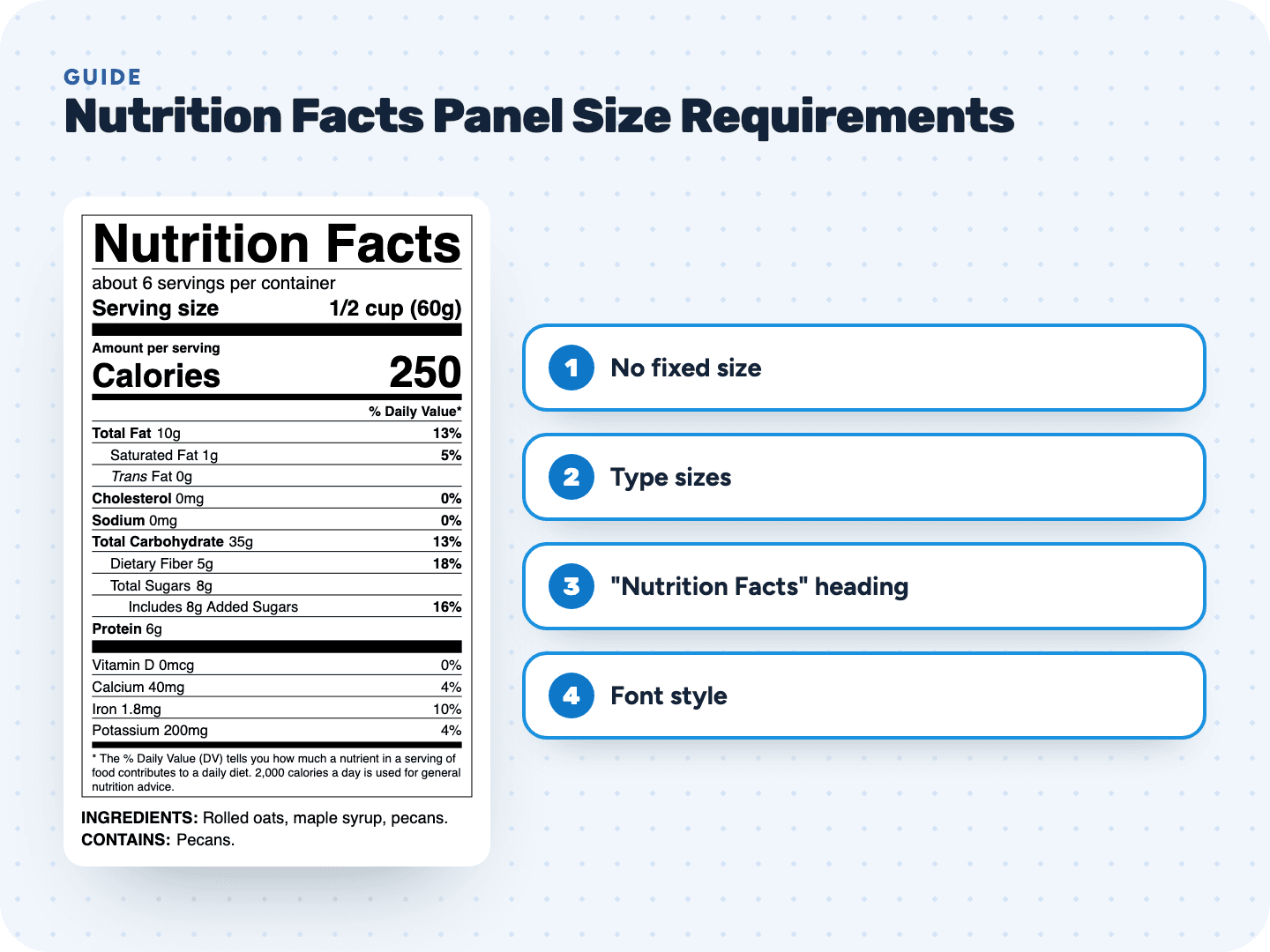
There is no fixed label size
FDA doesn't set a width or height for the Nutrition Facts panel. It sets minimum type sizes, line spacing and rules. Those minimums, plus the 15 required values, decide how small your panel can get.
That's why you can't just shrink a finished label to fit a small jar. Scale a standard label to 70% and the 8 point nutrient lines become 5.6 point, below the minimum. Pick a format made for less space instead.
Minimum type sizes, line by line
Here is every FDA nutrition label font size minimum, for the three main families of formats:
| Line | Standard vertical | Tabular | Small-package tabular and linear | Bold |
|---|---|---|---|---|
| Servings per container | 10 pt | 10 pt | 9 pt | No |
| Serving size | 10 pt | 9 pt | 9 pt | Yes |
| "Calories" | 16 pt | 10 pt | 10 pt | Yes |
| The calorie number | 22 pt | 22 pt | 14 pt | Yes |
| Nutrient lines, vitamins and minerals | 8 pt | 8 pt | 8 pt | Main nutrients only |
| "Amount per serving", "% Daily Value*", footnote | 6 pt | 6 pt | 6 pt | Headings only |
| Calories per gram line (optional) | 6 pt | 6 pt | 6 pt | No |
- If the serving size doesn't fit its space, 8 point is allowed on any package
- The serving size amount is right-justified when there's room
- The dual column tabular format uses the tabular minimums for "Calories" and serving size
- Packages with less than 12 sq in that carry a label anyway: everything at least 6 point, or all capitals at least 1/16 inch tall
How big "Nutrition Facts" must be
The heading has no point size of its own. It must be no smaller than any other text on the panel, except the calorie number. On a standard label the word Calories is at least 16 point, so the heading is at least 16 point too.
Unless that's impractical, the heading also runs the full width of the nutrient list below it. Most labels set it as wide as the box allows.
Font style: Helvetica is not required
The regulation asks for a single easy-to-read type style, not a specific font. FDA's Food Labeling Guide says any legible type style may be used, not just Helvetica. FDA's own illustrative label is set in Helvetica Black and Helvetica Regular, which is why so many labels look alike.
- One type style for the whole panel
- Upper and lower case letters
- At least 1 point of leading between lines, and 4 points for the nutrient and vitamin lines
- Letters never touch
FDA strongly recommends following the graphic specifications in Appendix B to Part 101 for a uniform look. They're a recommendation; the minimums above are the rule.
What's bold, and what isn't
- Nutrition Facts
- Serving size
- Amount per serving
- % Daily Value*
- Calories
- The calorie number
- Total Fat
- Cholesterol
- Sodium
- Total Carbohydrate
- Protein
- % Daily Values from Total Fat to Protein
Indented lines like Saturated Fat, Dietary Fiber and Total Sugars stay regular, and so do the vitamins and minerals. Nothing else may be highlighted, and reverse printing (white on black) isn't allowed as a way to highlight.
Hairlines, bars and color
- The panel is boxed with hairlines
- A hairline separates "Nutrition Facts" from servings per container
- A hairline separates each nutrient line from the ones above and below
- A bar sits between serving size and "Amount per serving"
- A bar sits between calories and the "% Daily Value*" heading
- A bar sits above the vitamins and minerals, and another above the footnote
- Text is all black or one color, on a white or other neutral background
That leaves no room for a second color, gradients or patterned backgrounds inside the panel. Keep it plain and put the design work around it.
Which format fits your package
The food nutrition facts label size requirements change with the space your package has for labeling:
| Your package | You may use |
|---|---|
| Enough room on the front or information panel | The standard vertical label, on the principal display panel or the information panel |
| Less than about 3 inches of continuous height | The tabular (wide) display |
| More than 40 sq in, but the front and information panel are full | Any other panel shoppers can readily see |
| 40 sq in or less | Abbreviations and any label panel. If no standard or tabular label fits: the small-package tabular display, or linear if even that won't fit |
| Less than 12 sq in | No label needed if you make no nutrition claims; print an address or phone number for nutrition information instead |
Small-package tabular and linear labels may drop the footnote and use "% DV = % Daily Value". Abbreviations include "Serv size", "Sat fat", "Cholest", "Total carb", "Fiber" and "Potas".
Printing at the right size
Most size problems happen after the label is done: someone scales it in a design file or picks a sticker that's too small. Our exports are built to avoid that.
- PDF downloads are vector and actual size, so your designer can place them at 100%
- SVG for designers, and PNG at 600 dpi
- Print sheets for Avery 5126, 5168, 5164 and 5163 never shrink the label; if it doesn't fit, the tool tells you
- Standard, tabular, small package (linear), dual column and simplified formats, so you can switch instead of shrinking